Real screens from the product — the views your team would work in day to day.
Figures from the demo environment, shown in the screens below
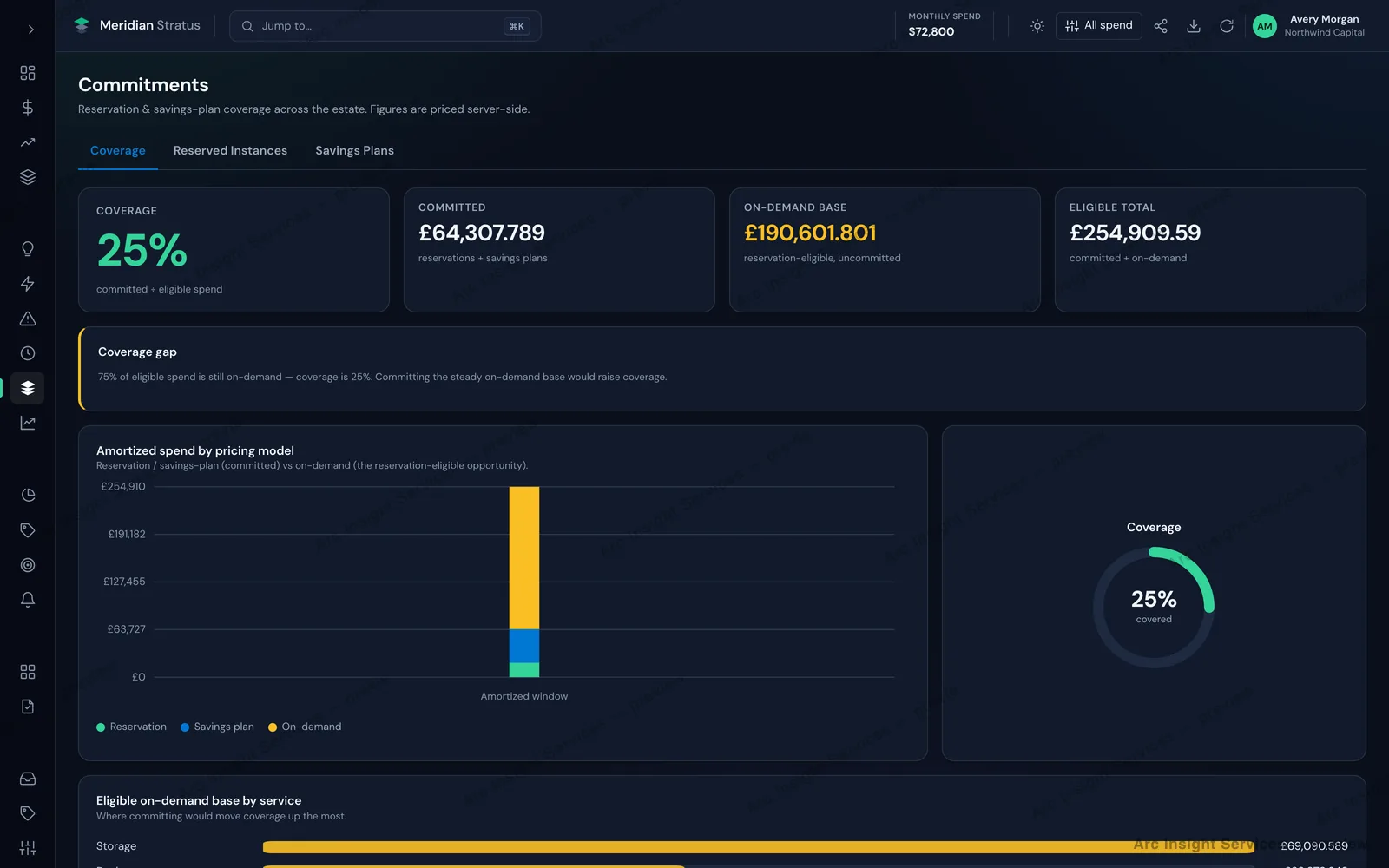
25%Commitment coverage
75%Eligible spend on-demand
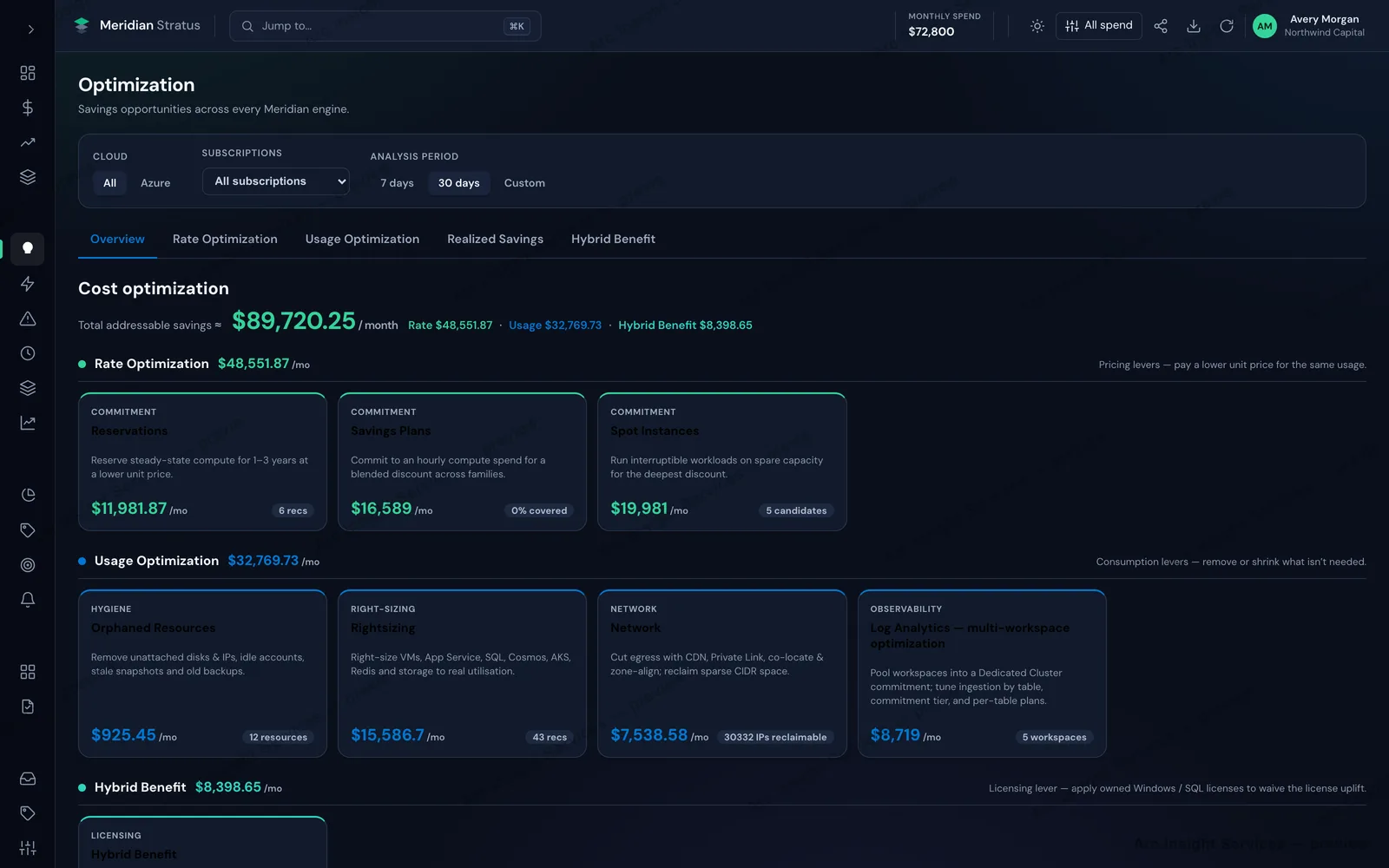
3Savings lever families
30 daysAnalysis window
Every lever, priced
The total is grouped by the KIND of change it asks for before it is grouped by lever, so the first decision is whether you are willing to change a price, a usage pattern or a licence — each of which is a different team's call.
Optimization — addressable savings across every lever. Powered by our Stratus engine.
Swipe to explore →
Coverage, and the gap you are paying for
Commitment coverage against the eligible base, the committed and on-demand totals behind it, an explicit coverage-gap callout, and amortized spend split by pricing model.
Commitments — reservation and savings-plan coverage. Powered by our Stratus engine.
Swipe to explore →
In practice
What FinOps SaaS looks like at work
2 screens from the product, and what each one is actually for.
Where the money goes
Opportunity, sorted by the lever that unlocks it
Savings are grouped by whether they need a rate change, a usage change or a licence change — because those are three different teams. The split turns one number into work someone can own.
Commitments
The gap between what you use and what you committed
Coverage is shown against the eligible base, so the uncommitted portion is explicit rather than inferred. That gap is the decision — commit it, or accept paying on demand.
How it helps
Why teams choose FinOps SaaS
The problems we hear most from teams in this space — and what changes once FinOps SaaS is in place.
Know the bill before it arrives
Most teams discover an overrun weeks later, when the invoice lands and the money is gone. Near-real-time ingestion across AWS, Azure, and GCP shows committed and projected spend daily, so overruns get caught while they're still fixable.
Every dollar has an owner
Untagged, unattributed spend makes accountability impossible and shared-service costs a running argument. Automated allocation rules and showback reporting assign cost to teams, products, and environments — including the shared tier.
Anomalies surface in hours, not cycles
A misconfigured job or a runaway autoscaler can burn a quarter's savings quietly. Baseline-aware anomaly detection alerts the owning team in their own channel, with the resource, the delta, and the likely cause attached.
Optimisation you can actually action
Generic 'rightsize this' lists get ignored because nobody trusts the blast radius. Recommendations come ranked by annualised saving with usage evidence, risk notes, and commitment-coverage modelling for reservations and savings plans.
Capabilities
Everything FinOps SaaS does
The full capability set, grouped so you can find the part that matters to your team.
Visibility
Near-real-time cost ingestion surfaces an overrun while it is happening, not when the invoice lands.
Automatic attribution gives every dollar an owner, including shared-service costs.
Unit economics report cost per customer, per transaction and per environment.
Budgets are set per team and per environment, with spend tracked against them continuously.
Optimisation
Addressable savings are split across rate, usage and licensing levers so each has an owner.
Recommendations are ranked and state their blast radius, so the risk of acting is explicit.
Commitments and anomalies
Commitment coverage is reported with an explicit coverage-gap callout naming the uncommitted base.
Amortized spend is split by pricing model, separating reservation and savings-plan cover from on-demand.
Baseline-aware anomaly detection surfaces a runaway job in hours rather than at the end of a billing cycle.
Get started
Two ways to see FinOps SaaS
Get your hands on it in a hosted demo workspace, or have a consultant walk you through it — whichever suits how you evaluate.
Demo access
Try it yourself
Request access and we'll provision a personal FinOps SaaS demo workspace — a 7-day trial, with your access details sent to your email, usually within one business day.
Quick demo
See FinOps SaaS in action
Prefer a guided tour? Leave your details and a consultant will set up a short walkthrough — usually within one business day.