A customer relationship platform unifying sales, service, and marketing — 360° customer views, pipeline automation, and analytics that turn data into decisions.
Real screens from the product — the views your team would work in day to day.
Figures from the demo environment, shown in the screens below
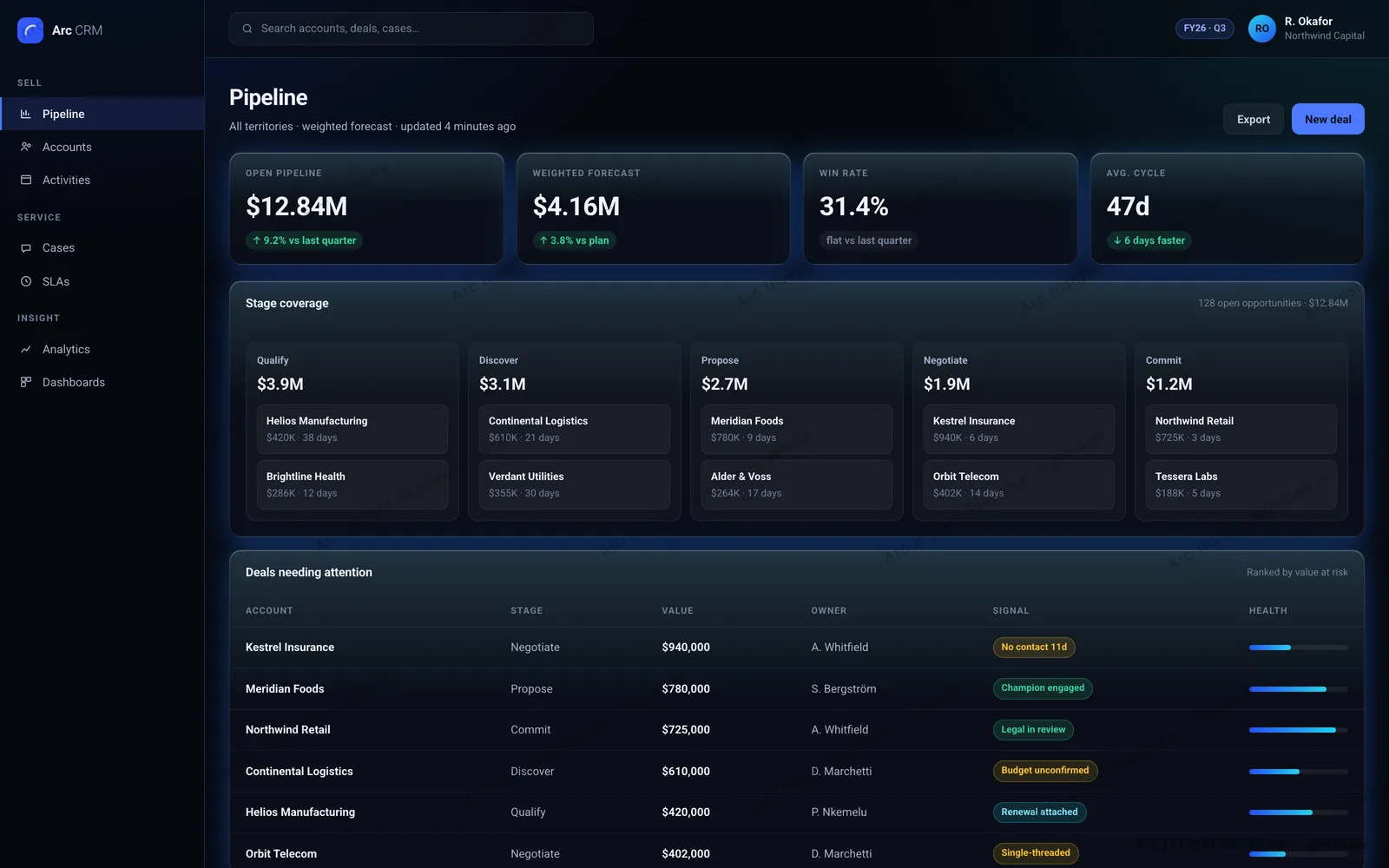
$12.84MOpen pipeline
$4.16MWeighted forecast
31.4%Win rate
47dAverage cycle
Open pipeline, weighted, and what threatens it
Four figures across the top — open pipeline, weighted forecast, win rate and average cycle — sit above a five-stage coverage board and a table of deals ranked by value at risk, each carrying a signal and a health bar.
Pipeline — weighted forecast and stage coverage
Swipe to explore →
One record, three departments
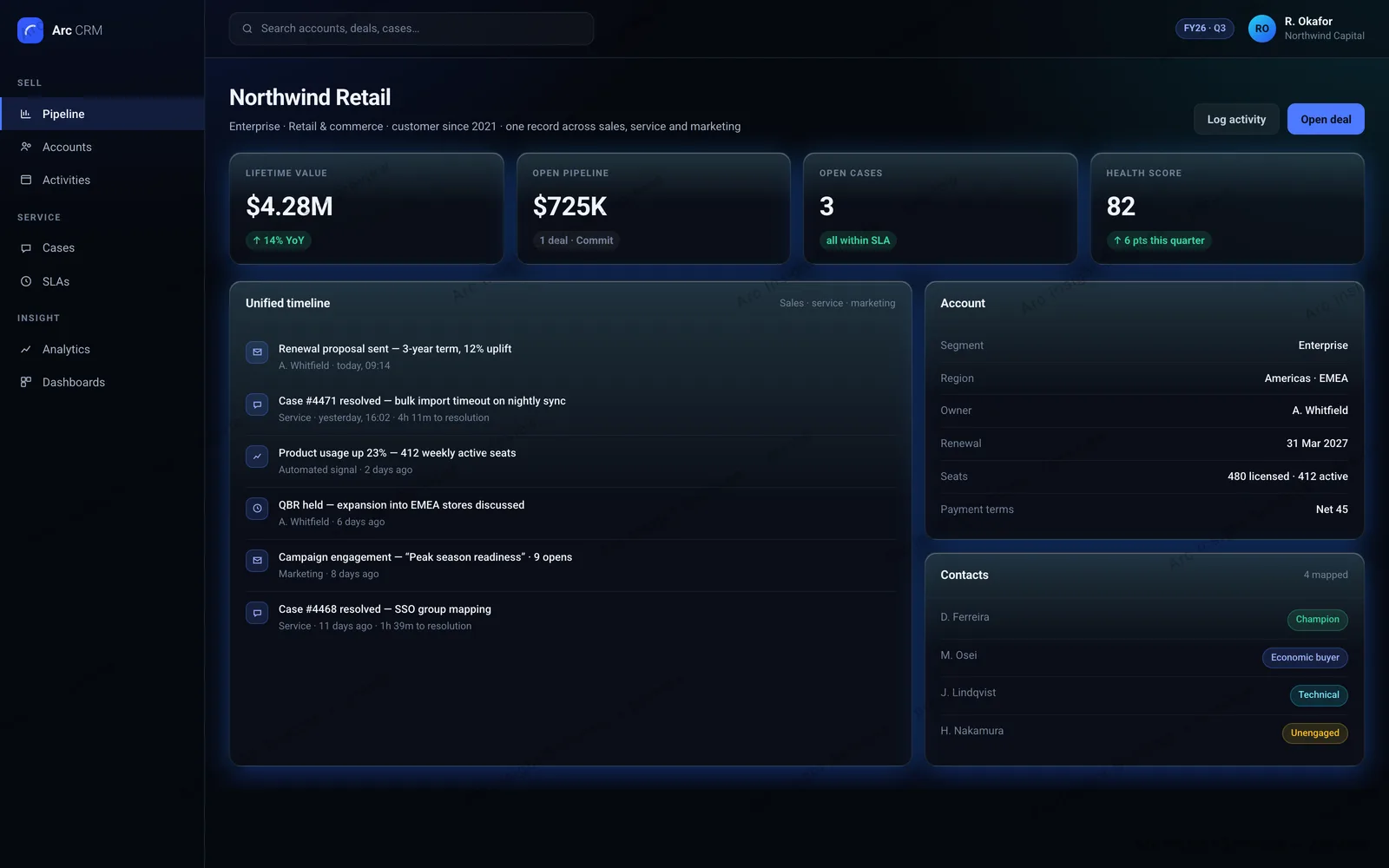
One column instead of three tabs. The header answers what the account is worth and what is outstanding; everything that has happened to it runs underneath in the order it happened, whoever did it.
Customer 360 — one record across sales, service and marketing
Swipe to explore →
In practice
What CRM Suite looks like at work
2 screens from the product, and what each one is actually for.
Forecasting
See the number and what it rests on
A forecast is only useful if you can interrogate it. The weighted figure sits beside the stage board that produces it and the deals putting it at risk, so a review moves from arguing about the total to working the exceptions.
The account view
Everything about an account, on one screen
Sales, service and marketing history stop being three tabs. Opening a customer shows the value, the open work and the full activity trail together, so nobody rebuilds context before a call.
How it helps
Why teams choose CRM Suite
The problems we hear most from teams in this space — and what changes once CRM Suite is in place.
One customer record, not seven
Sales, service, and marketing each keep their own version of the truth, so nobody trusts the numbers. A single 360° record — accounts, contacts, tickets, campaigns, invoices — gives every team the same customer, updated in real time.
Pipeline that updates itself
Reps lose hours a week to manual CRM hygiene and forecasts still slip. Automated stage progression, activity capture, and deal scoring keep the pipeline current from the work your team already does — and make the forecast defensible.
Fits your process, not the other way around
Off-the-shelf CRM forces teams to bend their sales motion to the tool. Configurable objects, stages, and workflow rules model how you actually sell — including multi-entity and multi-currency operations — with no forked codebase to maintain.
Governance auditors accept
Customer data spread across disconnected tools is a compliance liability. Role-based access, field-level permissions, consent tracking, and a full audit trail keep GDPR and regional data-residency obligations demonstrably met.
Capabilities
Everything CRM Suite does
The full capability set, grouped so you can find the part that matters to your team.
Pipeline and forecasting
Weighted pipeline forecasting reports open pipeline, win rate and average cycle time on one screen.
A five-stage coverage board shows how much value sits at each stage of the funnel.
A deals-needing-attention list ranks opportunities by value at risk, with a health indicator on each.
Automated stage progression and activity capture keep the pipeline current without manual CRM hygiene.
The customer record
Customer 360 merges sales, service and marketing activity into a single timeline per account.
Lifetime value, open pipeline and open cases sit on the record itself, not in a separate report.
Email and calendar sync, duplicate merge, and import from an incumbent CRM are built in.
Analytics and control
Cohort, funnel and retention analytics are built in, so reporting questions do not become data projects.
Objects, stages and workflows are configurable to match an existing sales motion rather than replacing it.
Role-based access, field-level permissions and an audit trail satisfy enterprise data governance review.
Get started
Two ways to see CRM Suite
Get your hands on it in a hosted demo workspace, or have a consultant walk you through it — whichever suits how you evaluate.
Demo access
Try it yourself
Request access and we'll provision a personal CRM Suite demo workspace — a 7-day trial, with your access details sent to your email, usually within one business day.
Quick demo
See CRM Suite in action
Prefer a guided tour? Leave your details and a consultant will set up a short walkthrough — usually within one business day.